Fish shell#
Why use Fish? Because it’s user-friendly, comes with auto suggestions, syntax highlighting, and is much more modern compared to Bash or zsh.
sudo pacman -S fishMaking fish the default shell:#
chsh -s /usr/bin/fishEdit greeting message#
set -U fish_greeting "Hello there"or you can disable it
set -U fish_greetingcustomize fish prompt#
The reference is Tide fish prompt.
# install fisher (to easily install fish plugins)
sudo pacman -S fisher
# install tide prompt
fisher install IlanCosman/tide@v6
# to open the configuration wizard
tide configure
Terminal (with cursor animations)#
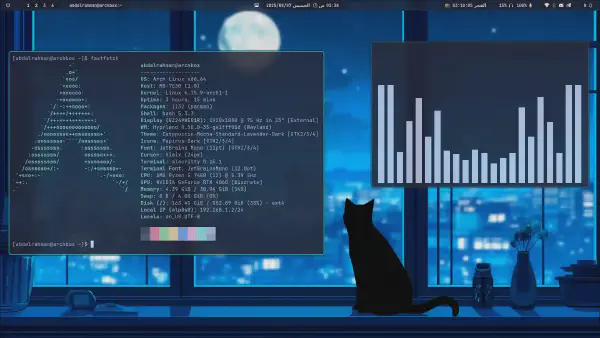
I’ve tried 2 terminals that enables cursor trail or animations, Alacritty and Kitty. It’s by default available in kitty but in alacritty you must build it from source with some shaders. Here are the 2 options, my default terminal now is Kitty as also it supports images like in fastfetch shows below and other features.
Alacritty#
There’s an Alacritty fork that supports cursor animations which looks stunning.
You can build it from source or install it from the AUR if you’re using Arch Linux:
paru -S alacritty-smooth-cursor-gitYou can find my alacirtty config in my repo for Arch-Dots.
Kitty#
Just by adding this in ~/.config/kitty/kitty.conf cursor trail will work
cursor_trail 10
cursor_trail_decay 0.1 0.3
cursor_trail_start_threshold 0
Making commands output look better#
ls alternative (eza)#
sudo pacman -S ezaYou can these aliases (put them in ~/.config/fish/config.fish):
alias ls="eza -l --color --icons --git --group-directories-first"
alias la="eza -la --color --icons --git --group-directories-first"Pacman#
To enable colors and change progress bar look, edit /etc/pacman.conf,
under [options], add or uncomment Color and ILoveCandy.
Fastfetch#
Fastfetch is a CLI tool for fetching system information and displaying them in a pretty way. It’s better than neofetch which is deprecated now.
First you should specify what info to be displayed and the ascii figure that will appear.
You can run fastfetch --gen-config-full to generate a full config file with all optional options then you can comment what you don’t want to be displayed.
There will be default default ascii logo for your distro you can search on the web for any thing else. And feel free to see my dotfiles

You must install imagemagick to use png logos in fastfetch if your terminal supports that (kitty does).
sudo pacman -S imagemagickBtop#
You can edit just 2 lines to make it looks like this:
color_theme = "tokyo-night"
theme_background = False
Also you can select what blocks to show by default, I added gpu0
shown_boxes = "mem net proc gpu0 cpu"👉 You’re welcome to visit my Arch-Dots repo for all my dotfiles.
See also: